AI Almost Sold Me a Subscription I Didn't Need
I lead distributed engineering teams across multiple time zones, which means my work calendar can look strange on any given day — early morning calls to sync with Europe, midday blocks for other US offices, and the occasional odd gap where I’ve shifted my schedule around. Outside of work, I enjoy mentoring people on engineering leadership, connecting with folks to learn from each other, career counseling, or just jamming on music. I wanted to make it easy for people to book time with me — a quick breakfast or lunch during the week, or a longer session on the weekend. One link, respects my calendar, done.
It was not trivially easy. Or rather, it was — I just didn’t find the easy answer first.
The split-calendar problem
My work runs on Outlook, locked down behind corporate IT. My personal life runs on Gmail. Both calendars sync to my Android phone, so I can see everything in one view. The problem is letting other people see when I’m available without giving them access to either calendar directly. If you’re on iPhone with iCloud or you already pay for Calendly, this is old news. But I got curious about why it felt so hard for everyone else, and it turns out Android sits at about 70% of the global mobile market as of January 2026.
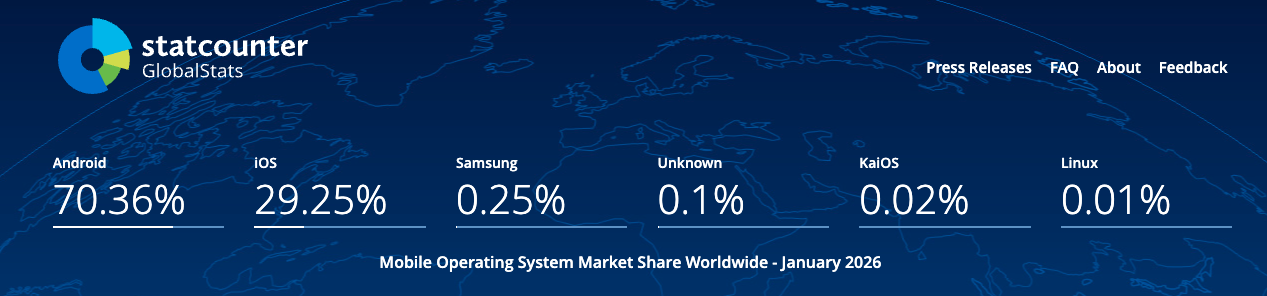
Seven out of ten smartphone users are on Android, and the scheduling tool ecosystem largely assumes you can authenticate directly against a cloud calendar provider — the exact thing enterprise IT blocks. So this isn’t just my problem.
I suspected Google Calendar could handle this natively. But instead of poking around in settings for five minutes, I did what a lot of us do now: I opened up Gemini and Claude and asked for help.
The rabbit hole
Gemini 3 Fast went deep. I’m talking five rounds of back-and-forth. It walked me through shadow calendars (where you manually duplicate every work meeting into a separate calendar — by hand), OAuth token flows, Android apps like Calendar.AI and SyncGene that bridge your phone’s local calendar data to the cloud, and free-tier comparisons across multiple scheduling platforms. It even produced a table comparing sync frequency and cost. I genuinely appreciated the thoroughness, every single recommendation was technically valid.
Claude took a different path but landed in the same place. It suggested Calendly, Cal.com (open source), and SavvyCal as products I can subscribe to. When I explained that my work calendar was behind corporate SSO and I cannot use my personal computer to link calendars, it pivoted to bridging apps like Sync My Calendar and DAVx5 to push data from my Android to the cloud. It did mention Google Calendar’s Booking Pages in passing, early in the conversation, but as one bullet among several rather than the obvious answer.
This was striking to me: across both conversations, every recommendation involved installing something new or creating an account somewhere. Neither tool paused to ask what I already had. They pattern-matched toward a new purchase rather than a native solution.
What I actually ended up doing
Since both calendars already synced to my phone, I checked my Android Calendar settings and made sure that data was flowing up to my Google account. One toggle I’d apparently never flipped. Once my work busy times appeared in Google Calendar alongside my personal events, I set up Booking Pages — a built-in Google Calendar feature that checks all your visible calendars for conflicts, including subscribed ones, and generates a shareable booking page.
No new apps. No subscriptions. No OAuth dance. Took me less time than either AI conversation did, which is a little ironic.
The Tech Literacy Tax
I keep coming back to what would have happened if I didn’t have a strong technical understanding of how calendar technology works — the difference between local and cloud calendars, what an ICS feed is, why enterprise auth blocks third-party integrations. If this was many years ago before I gained all this experience, I would have stopped at the first confident answer from my search tool, installed one of those bridging apps, maybe signed up for Cal.com’s free tier, hit the plan limit in a month, and upgraded to a paid subscription. Ten dollars a month for something one of my existing tools already does out of the box.
I think of this as a tech literacy tax: the money you end up spending on tools, apps, and subscriptions for things your existing software already handles, simply because you didn’t know to look. Nobody is being dishonest here. These models learned from a web that is saturated with “10 best tools” listicles, affiliate reviews, and product marketing pages. When you ask an AI how to solve a problem, it pattern-matches toward the products that exist to solve that problem, because that’s what the training data talks about. Nobody writes a listicle about the thing you already have.
These models are still learning
There’s a reasonable case that this gets better over time. These models improve through reinforcement learning from human feedback — essentially, when enough people flag the inaccuracy of the output from AI. The model adjusts its weights and learns to surface native solutions first. But we’re not there yet, and in the meantime, the tax is real — especially for the non-technical majority who take the first answer at face value.
It also makes me wonder about the scheduling tool market more broadly. There is a massive, legitimate need for enterprises at scale — the kind of complex, multi-stakeholder workflows that organizations deal with every day across billions of actions they take across multiple software products tightly integrated with data flows. In those environments, a robust, unified platform is the only way to manage that level of complexity. But for the basic personal use case — letting someone pick a time slot without a dozen emails — the “native” answer is often already sitting in your pocket. As core platforms continue to integrate features that once required a separate login, the niche market for standalone solutions will need to keep innovating to stay ahead of the game.
Before you install anything new or ask an AI what tool to use, it’s worth spending five minutes asking a simpler question: does the thing I already have do this?
In my experience, it usually does.
If you’re curious how this turned out, the “Book a Meeting” link on my Connect page is the result of this weekend rabbit hole.
This was a personal project, entirely unrelated to my day job. These are my own thoughts and opinions.